
Overview
Links allow users to navigate between different locations. They can be used as standalone (optionally with an icon) or inline within text.
Also known as Anchor, Text Link or Hyperlink .

When to use
Link is mainly used as a navigational element and usually appear within or directly following a paragraph or sentence. Use a hyperlink when linking to another document or URL.

Usage examples
Do's and Don'ts

Do
Match Link to the text size and font-weight of the content they are accompanying for consistency and visual balance.

Don't
Apply multiple text styles, when using links paired with text, as this can create inconsistency.

Do
Give the link a meaningful description that clearly indicates its destination.

Don't
Use generic phrases like "click here" or "go to" on links.

Do
Provide an external icon (e.g."new-window" icon) when the link text needs to refer to an external domain.
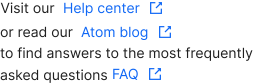
Don't
Overuse icons, especially when they are part of text content.

Do
Use the linked text with the default DS colour.

Don't
Change the colour of the linked text.

Don't
Replace link text with URL.