
Email design
Color
Color is a powerful tool in design that can evoke emotions, convey information, establish branding, and guide user actions. In email design, color plays a crucial role in creating a visually appealing and effective communication piece.
The use of colour in our emails is mostly reserved for the content (illustrations, photography, icons...) that the creative team provides.
The following colours can be used in Hubspot for customising UI elements like buttons, backgrounds, text, etc. and stay consistent with our branding.
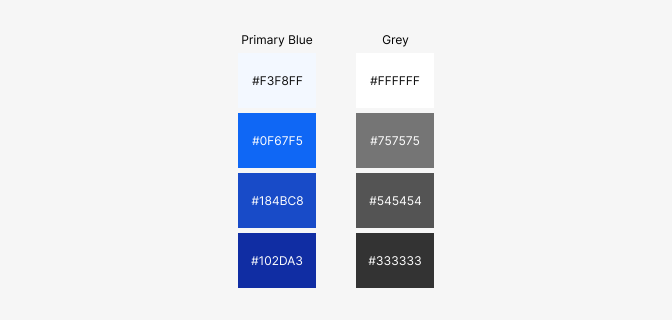
| Property | Hex | Use |
|---|---|---|
| PrimaryLight | #0F67F5 | Background secondary |
| Primary | #0F67F5 | Primary brand |
| PrimaryMid | #184BC8 | Secondary brand |
| PrimaryDark | #102DA3 | Footer background |
| White | #FFFFFF | Content Background |
| Grey | #757575 | Text minimal |
| GreyMid | #545454 | Text subtle |
| GreyDark | #333333 | Text regular (body, headlines) |
CTA Buttons
Use CTA buttons to communicate actions users can take and to allow them to navigate.

| Property | Primary | Secondary |
|---|---|---|
| Font | Arial | Arial |
| Font size | 16px | 16px |
| Font color | #FFFFFF | #0F67F5 |
| Background color | #0F67F5 | #FFFFFF |
| Border width | - | 2px |
| Border color | - | #0F67F5 |
| Corner radius | 4px | 4px |
| Alignment | Center | center |
| Padding | 12, 12, 24, 24 | 12, 12, 24, 24 |