
Structure
Avatars are used to show a thumbnail representation of an individual or entity in the interface.
Avatars can be interactive, in which case has interactive states (hover, focus, etc), or read only, with no interactive states.
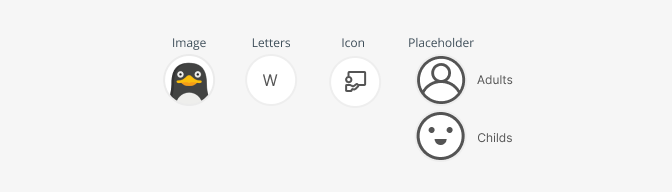
For avatars representing the user, the user picture is displayed. If there is an error loading the src of the avatar, there are 2 fallbacks:
- If there's a name prop, we use it to generate the initials
- If there's no name prop, we use a placeholder image.
Size
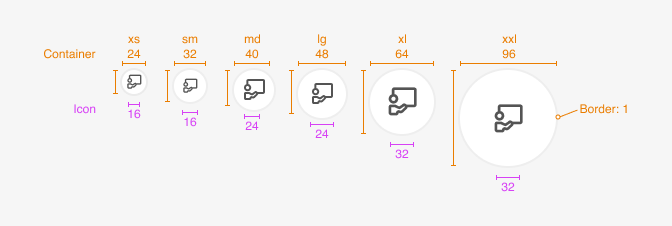
| Property | xxl | xl | lg | md | sm | xs |
|---|---|---|---|---|---|---|
| container size | $7 96px | $6 64px | $5 48px | $4 40px | $3 32px | $2 24px |
| Icon size | "lg" 32px | "lg" 32px | "md" 24px | "md" 24px | "sm" 16px | "sm" 16px |
| Property | Token | Pixel |
|---|---|---|
| Border stroke | not-defined | 1px |
| Border stroke: selected, focus | not-defined | 2px |
Avatar groups
In some cases, you might need to stack avatars as a group. To limit the amount of avatars to show, use the max prop. It'll truncate the avatars and show a "+X" label (where X is the remaining avatars).
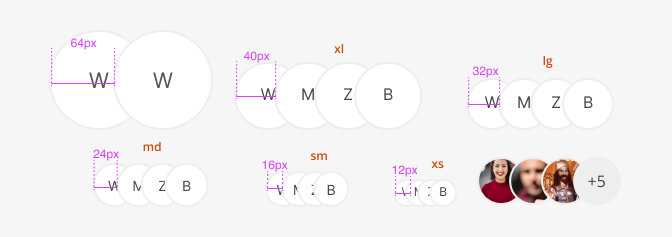
| Property | xxl | xl | lg | md | sm | xs |
|---|---|---|---|---|---|---|
| Distance between | $9 64px | $7 40px | $6 32px | $5 24px | $4 16px | $3 12px |
Typography
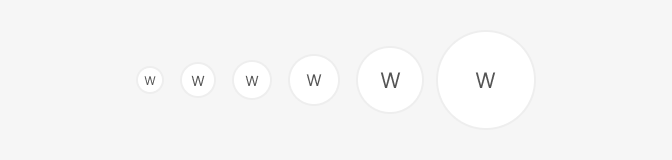
| Font size | px | weight | size |
|---|---|---|---|
| xs | 12 | 0.750rem | $xs |
| sm, md | 14 | 0.875 | $sm |
| lg | 16 | 1 | $md |
| xl, xxl | 21 | 1.3125 | $lg |
Color
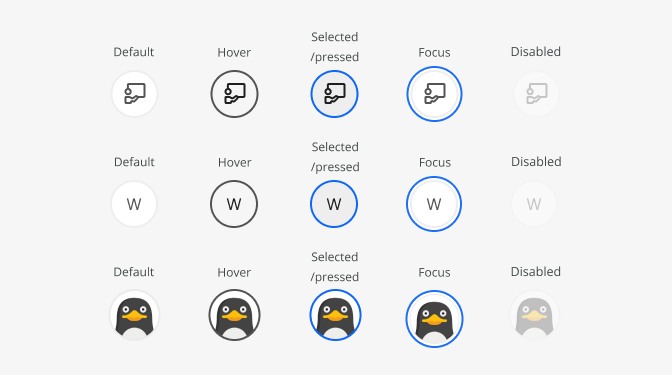
| Property, element - state | Token | Hex |
|---|---|---|
| Bg color - default, focus, disabled | $white | #ffffff |
| Bg color - hover | $grey100 | # |
| Bg color - selected/pressed | $grey200 | # |
| Border-color - default, focus, disabled | $grey200 | # |
| Border-color - hover | $grey800 | # |
| Border-color - selected/pressed | $blue800 | # |
| Icon-color/font-color - default, focus, disabled | $grey800 | # |
| Icon-color/font-color - hover, selected | $grey1000 | # |