
Structure
Empty states are messages that provide an explanation of an interface in absence of content.
The message can include Title and/or Body and sometimes they appear together with an illustration and actionable buttons.
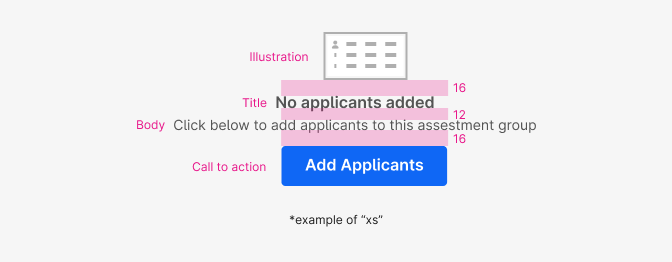
| Element & Property | Token | Pixel | Rem |
|---|---|---|---|
| xs, sm, md - Illustration Margin-bottom | space $4 | 16px | 1 |
| lg, xl - Illustration Margin-bottom | space $24 | 24px | - |
| xs, sm, md - Title Margin-bottom | space $3 | 12px | 0.75 |
| lg, xl - Illustration Margin-bottom | space $4 | 16px | 1 |
| lg, xl - Illustration Margin-bottom | space $4 | 16px | 1 |
| lg, xl - Illustration Margin-bottom | space $24 | 24px | - |
Size
There’s 5 different sizes for empty state illustrations. We start designing for “xs” 56x32px and then we multiply each size by x1.5.
“md” and “lg” share the same illustration size but “lg” adds a semicircle on the background that comes from the logo of Atom making the total illustration bigger (also for “xl”).
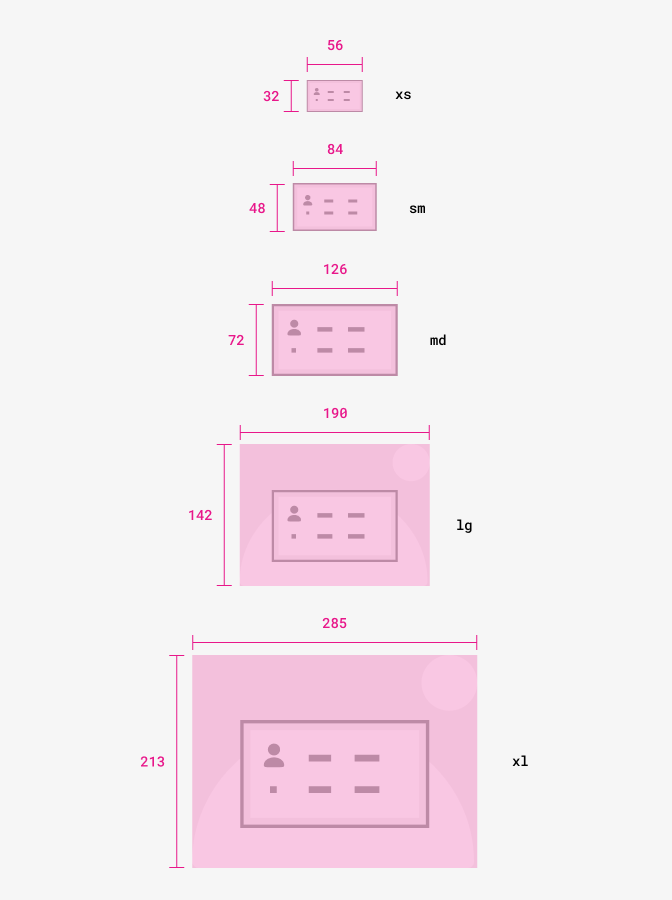
| Illustration container size | Width x Height (pixels) |
|---|---|
| xs | max-width & max-height 56x32 |
| sm | max-width & max-height 84x48 |
| md | max-width & max-height 126x72 |
| lg | max-width & max-height 190x142 |
| xl | max-width & max-height 285x213 |
Typography

All text is centered aligned.
| Font | Family | Size | Weight | Pixels | Rem |
|---|---|---|---|---|---|
| Title - xs, sm, md | $body | $md | 600 | 16 | 1 |
| Title - lg, xl | $body | $lg | 600 | 21 | 1.3125 |
| Body - xs, sm, md | $body | $sm | 400 | 14 | 0.875 |
| Body - lg, xl | $body | $md | 400 | 16 | 1 |
Color
We use a minimal and simple approach to colour for empty states, using a muted greyscale that makes it clear that it’s an unactive illustration communicating that something is missing or doesn’t fully work yet. It also helps to bring users attention to the primary action instead of the illustration.
We have two different background colours for our apps:
- White
- Light-blue
The semicircle colour in lg and xl images would change from grey to white when placed within a light-blue background. That means we have 2 images for each illustration.
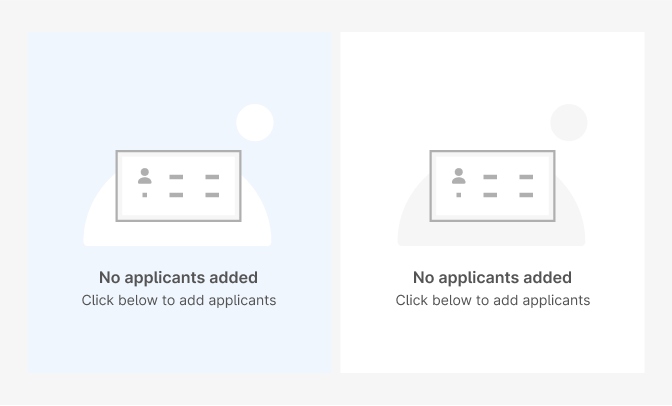
| Property & Element | Token | Hex |
|---|---|---|
| Font-color Title | $grey800 | # |
| Font-color Body | $grey800 | # |