
Structure
Simple text and optional icon to inform the user of relevant information, revealed in context.
There are two sizes for inline messages. The message can appear by itself, icons are optional.
When the text is too long for the available horizontal space, it wraps to form another line. The optional icon stays aligned to the top-left corner.
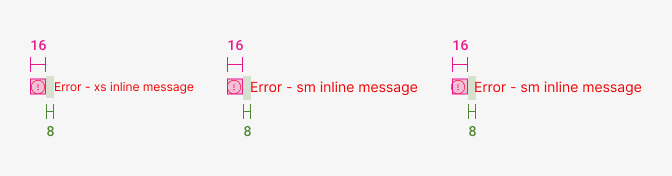
| Property - element | Token | Pixel | Rem |
|---|---|---|---|
| Size icon | $1 (variant: size="sm") | 16px | 1 |
| Margin-right icon | space $2 | 8px | 0.5 |
Typography

| Element | Family | Weight | Size | rem | px |
|---|---|---|---|---|---|
| XSmall text font | $body | 400 | $xs | 0.75rem | 12 |
| Small text font | $body | 400 | $sm | 0.875rem | 14 |
| Medium text font | $body | 400 | $md | 1rem | 16 |
Color

| Property - State - Element | Token | Hex |
|---|---|---|
| Error - icon/text | $danger | #EE0505 |
| Warning - icon | $warningDark | #D08E00 |
| Warning - text | $warningText | #BD4B00 |
| Success - icon/text | $success | #028A00 |
| Neutral/help - icon/text | $grey800 | #545454 |
| Info - icon/text | $blue800 | #0F67F5 |