
Pagination
Structure
The pagination component is used whenever a user needs to navigate through a list of items that is too long to fit on one page.
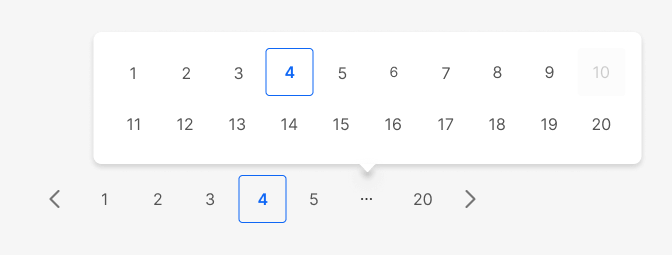
It includes a "previous" and "next" chevron button, and several numbered buttons that correspond to different pages of the data.
Anatomy
- The pagination component typically consists of several buttons that allow the user to navigate to different pages of the data.
- The buttons will typically include a "previous" button, a "next" button, and several numbered buttons that correspond to different pages of the data.
- When the number of pages exceeds the maximum display limit, an ellipsis button is used to truncate the remaining pages. This button will appear as the last but one element to let users know the total amount of pages.
- The current page will be indicated with a different style and color to make it clear to the user which page they are currently on.
- Additionally, it may include a text or label indicating the current page and the total number of pages.
The default/basic component:
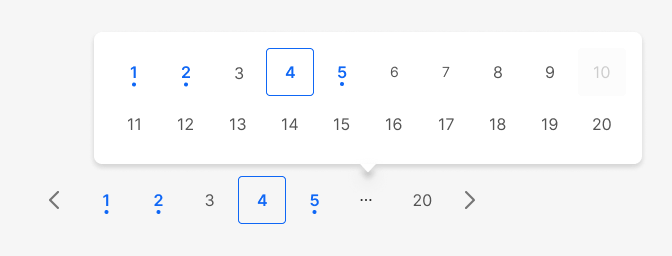
A special variant for Mock tests that display adds color fill when the question has been answered:
Spacing and sizing
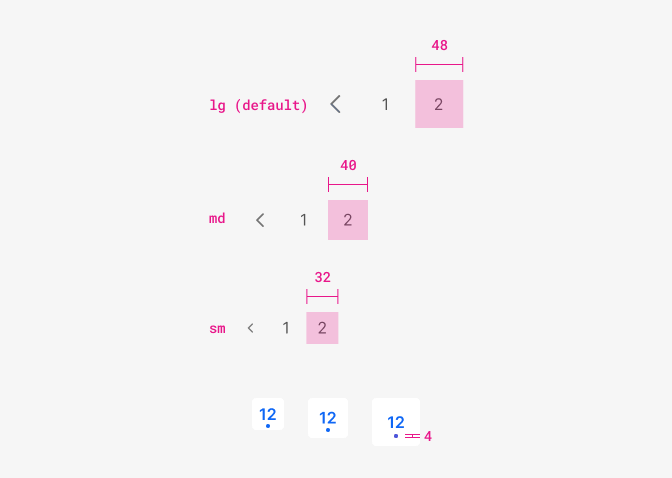
| Property | Token | px | rem |
|---|---|---|---|
| Button size sm | size $3 | 32px | 2 |
| Button size md | size $4 | 40px | 2.5 |
| Button size lg (default) | size $5 | 48px | 3 |
| Dot size | :( | 4px | 0.25 |
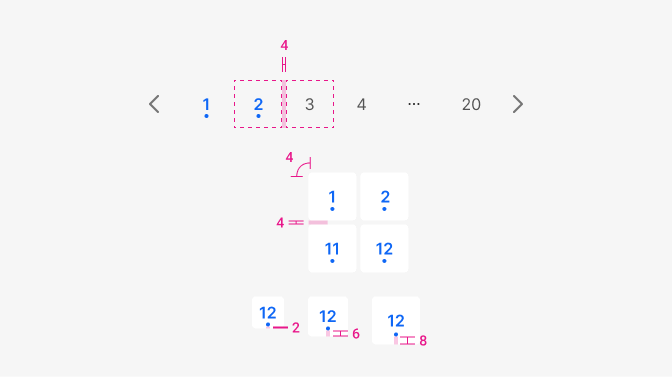
| Property | Token | px | rem |
|---|---|---|---|
| Space between items | space $1 | 4px | 0.25 |
| Border-radious | radii $0 | 4px | 0.25 |

| Property & element | Size | Appearance | Theme | isRounded |
|---|---|---|---|---|
| Action Icon | ‘sm’, ‘md, ‘lg’ | 'simple' | 'neutral' | 'no' |
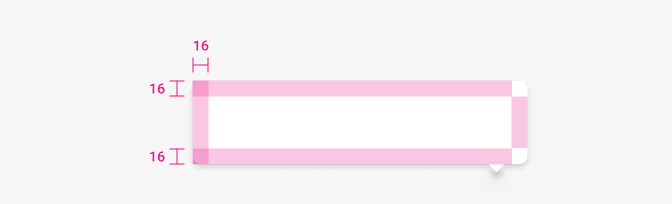
| Property | Token | px | rem |
|---|---|---|---|
| Border radius | radii-$1 | 8px | 0.5 |
| Padding | space-$4 | 16px | 1 |
| Shadow | shadow $2 | - | - |
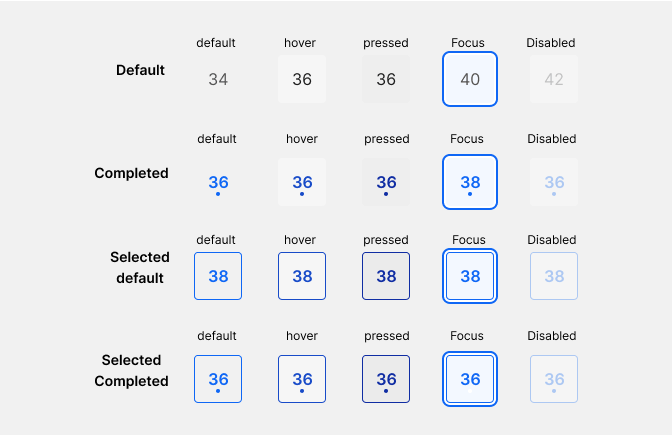
| Element | Family | Weight | Size | Rem | px |
|---|---|---|---|---|---|
| default | $body | 400 | $md | 1rem | 16 |
| Completed, selected, selected completed | $body | 600 | $md | 1rem | 16 |
Color
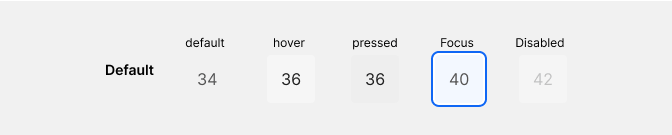
| Property & Element - State | Token | Hex |
|---|---|---|
| Bg color - default, disabled | transparent | - |
| Bg color - hover | $grey100 | # |
| Bg color - pressed | $grey200 | # |
| Bg color - focus | $blue100 | # |
| Border color - focus (2px) | $blue800 | # |
| Inside border/shadow - selected focus (2px-2px gap) | $white | # |
| Font-color - Default, focus, disabled | $grey800 | # |
| Font-color - Hover, pressed | $grey1000 | # |
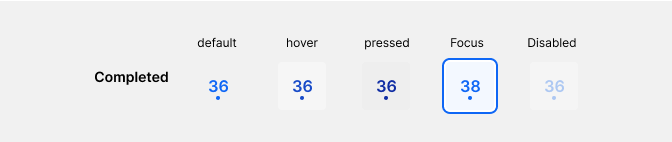
| Property & Element - State | Token | Hex |
|---|---|---|
| Bg color - default, disabled | transparent | - |
| Bg color - hover | $grey100 | # |
| Bg color - pressed | $grey200 | # |
| Bg color - focus | $blue100 | # |
| Border color - focus (2px) | $blue800 | # |
| Inside border/shadow - selected focus (2px-2px gap) | $white | # |
| Font-color - Default, focus, disabled | $blue800 | # |
| Font-color - Hover | $blue900 | # |
| Font-color - Pressed | $blue1000 | # |
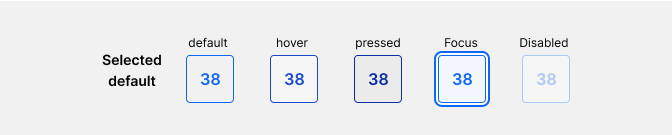
Same as the one above with the addition of border-color
| Property & Element - State | Token | Hex |
|---|---|---|
| Border-color - default, focus, disabled | $blue800 | # |
| Border-color - hover | $blue900 | # |
| Border-color - pressed | $blue1000 | # |
| Border-color - focus (2px) | $blue800 | # |
| Property & Element - State | Token | Hex |
|---|---|---|
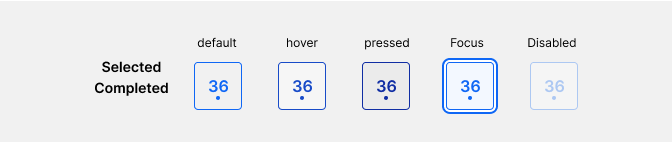
| Dot color - default, focus, disabled | transparent | - |
| Doc color - hover | $grey100 | # |
| Doc color - pressed | $grey200 | # |
| Doc color - focus | $blue100 | # |