
Structure
A component that lets users select between a group of 2-6 options (segments), all stored in one container.
It should generally be used at the top level of navigation in a page and have a single selectable option.
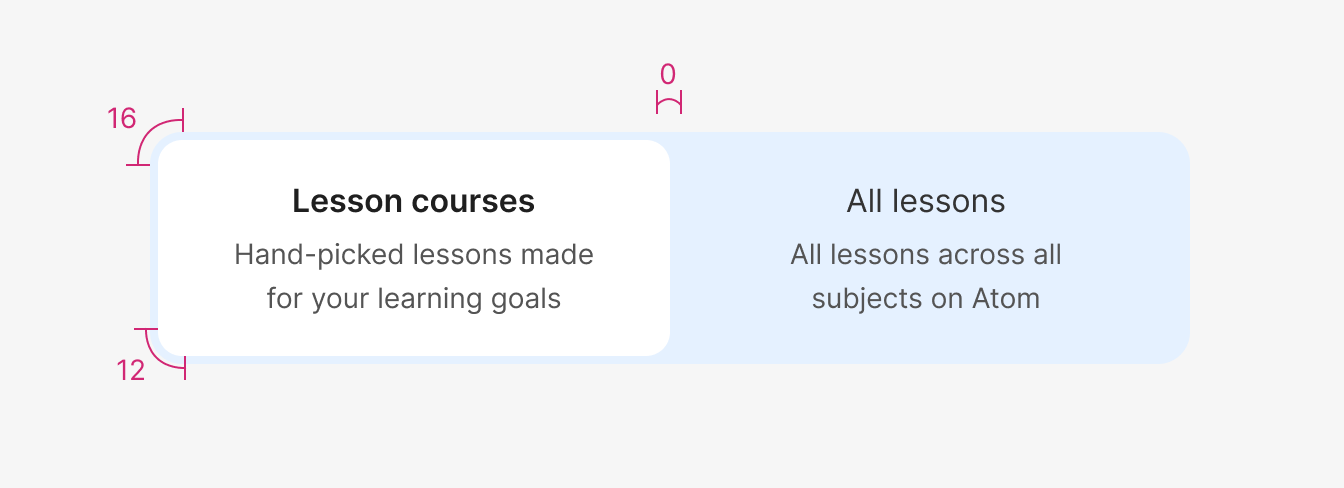
| Property | Token | Pixel | Rem |
|---|---|---|---|
| Border radius - segment | radii-2 | 12px | 0.75 |
| Border radius - container | radii-3 | 16px | 1 |
| Property | Pixel |
|---|---|
| Border-width (inside) - Focus | 2px |
Size
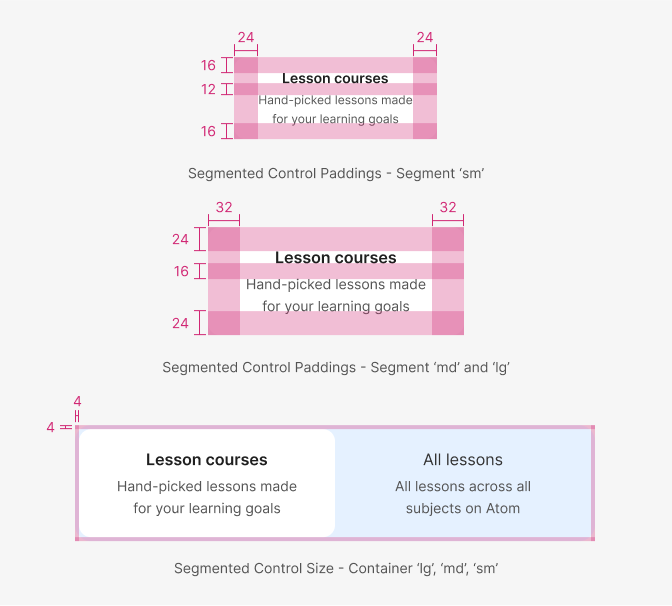
The size of the segment’s padding and typography will vary with each of the size variants of the component.
For the md and lg size variants of the segment, the padding sizes and behaviour will be identical. As these would be primarily used for bigger breakpoints, each segment in the group should have the same size, inheriting the size of the biggest segment when the content size within is different.
For the sm variant, we want each segment to wrap around the content, given the minimum padding shown, even if that means some segments would be bigger than others. This is to save space and fit as much as possible on mobile breakpoints, where this would be primarily used.
The padding of the container around the segment group will remain the same across all size variants.
| Segment | Token | Pixel | Rem |
|---|---|---|---|
| Padding-horizontal sm | space-4 | 16px | 1 |
| Padding-vertical sm | space-24 | 24px | 1.5 |
| Padding-horizontal md, lg | space-5 | 32px | 2 |
| Padding-vertical md, lg | space-24 | 24px | 1.5 |
| Title margin-bottom sm | space-3 | 12px | 0.75 |
| Title margin-bottom md, lg | space-4 | 16px | 1 |
| Container | Token | Pixel | Rem |
|---|---|---|---|
| Padding-horizontal | space-1 | 4px | 0.25 |
| Padding-vertical | space-1 | 4px | 0.25 |
Segment with an icon
| Segment | Token | Pixel | Rem |
|---|---|---|---|
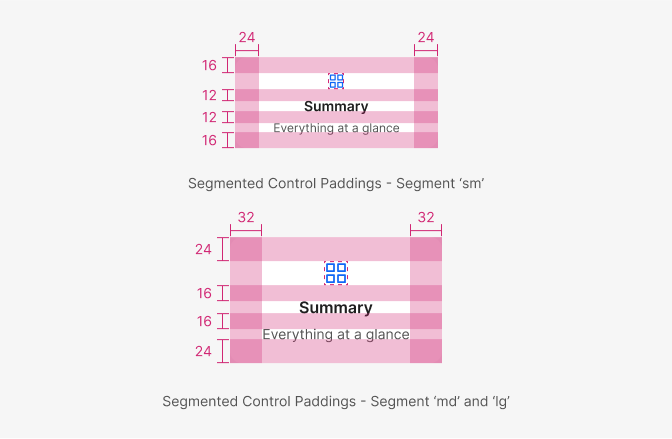
| Icon margin-bottom sm | space-3 | 12px | 0.75 |
| Icon margin-bottom md, lg | space-4 | 16px | 1 |
| Icon size sm | sm | 16px | - |
| Icon size md, lg | md | 24px | - |
Typography
| Property - element | Family | Weight | Size | Rem | px |
|---|---|---|---|---|---|
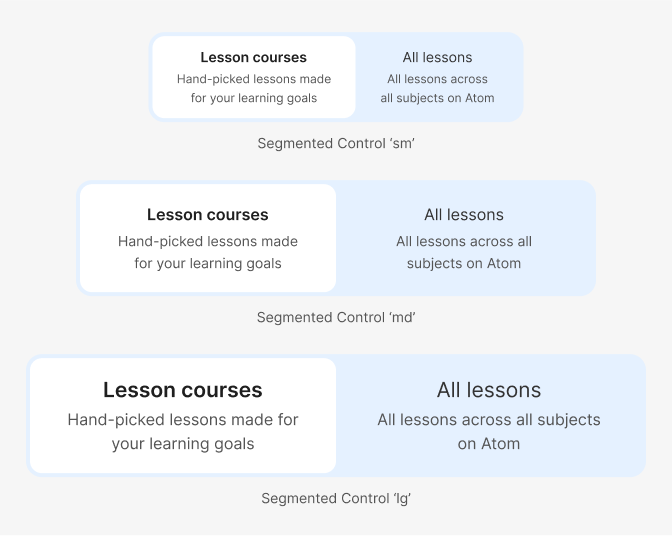
| Font - title sm | $body | 600 | $sm | 0.875 | 14 |
| Font - description sm | $body | 400 | $xs | 0.75 | 12 |
| Font - title md | $body | 600 | $md | 1 | 16 |
| Font - description md | $body | 400 | $sm | 0.875 | 14 |
| Font - title lg | $body | 600 | $lg | 1.3125 | 21 |
| Font - description lg | $body | 400 | $md | 1 | 16 |
Colour
The segmented control uses a set of high-contrast neutral colours for the selected segment and darker lower-contrast colours for the unselected segments and container. This is with the goal of focusing the user’s attention on the selected option.
The unselected segments and container should match the background colour of the page where the component is used. This is to allow for a consistent look within both Atom and Quest, as well as use with different-coloured themes in Atom Home.
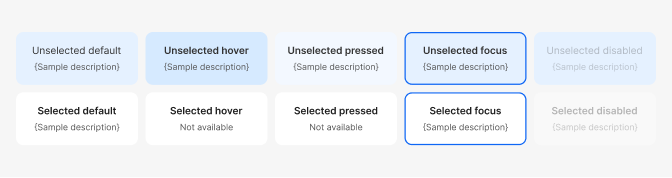
| Property, element & state | Token | Hex |
|---|---|---|
| Bg colour - Selected default | $white | #ffffff |
| Bg colour - Unselected default | $primary200 | #e5f1ff |
| Bg colour - Unselected hover | $primary300 | #d6eaff |
| Bg colour - Unselected pressed | $primary100 | #f2f8ff |
| Bg colour - Container | $primary200 | #e5f1ff |
| Border-colour - Focus | $primary | #0F67F5 |
| Font-color - Title, all states | $color-text-bold | #545454 |
| Font-color - Description, all states | $color-text-subtle | #0F67F5 |
| State | Value |
|---|---|
| Disabled: all elements | 30% opacity |