
Structure
A stepper is a visual representation of a user’s progress through a set of steps, indicating how much the user has completed or how far they are from completing a task.
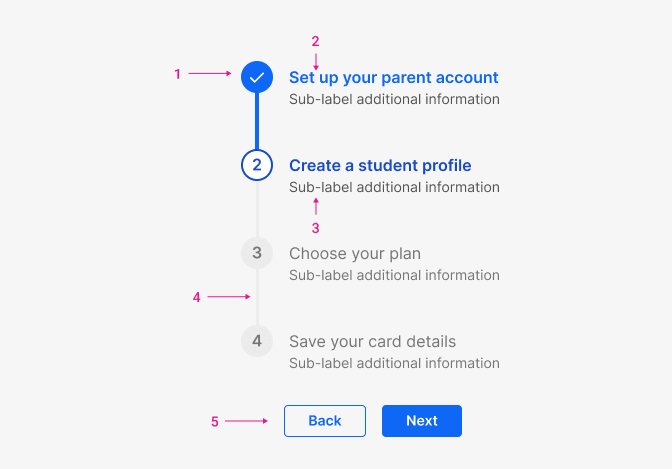
Anatony
- Step identifier: Current status of a step
- Step title (optional): Step name
- Step sub-title (optional): Text that provides additional information about a step
- Connection line: Connects steps and pagination arrows within the stepper
- Nagination: Buttons enabling navigation to previous and forward steps
Size
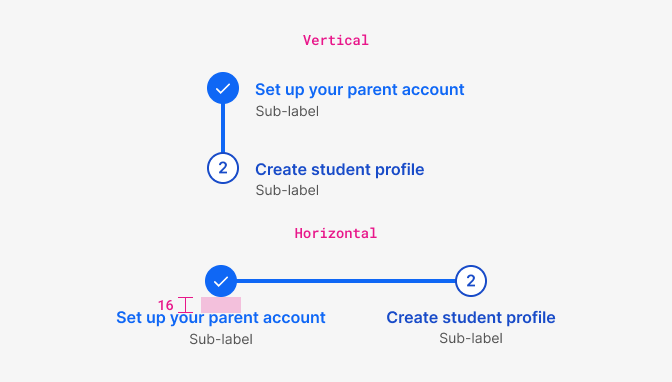
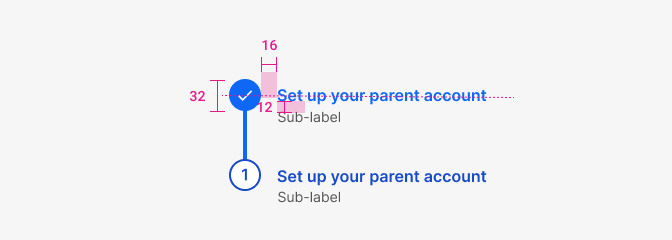
| Property | Token | px | rem |
|---|---|---|---|
| Step identifier size | size $3 | 32px | 2 |
| Margin step-title | space $4 | 16px | 1 |
| Margin-bottom title | space $3 | 12px | 0.75 |
| Connection line width | - | 4px | - |
States
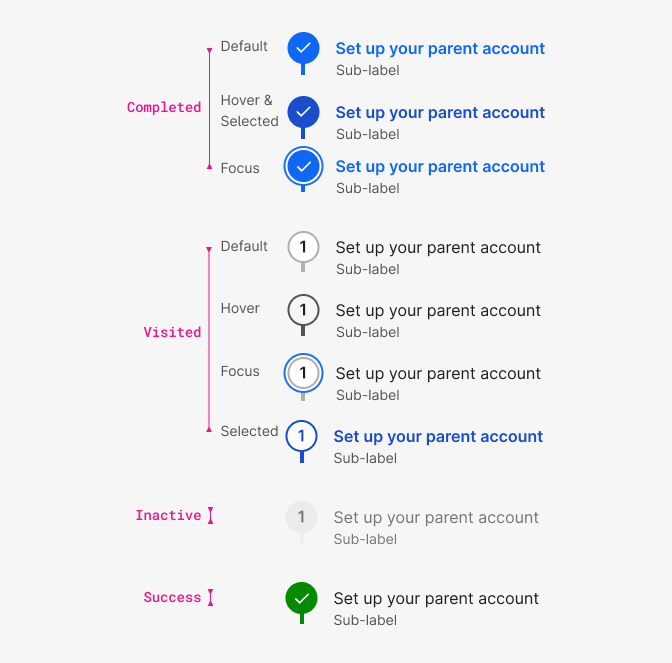
Typography

| Element - status | Family | Weight | Size | Rem | px |
|---|---|---|---|---|---|
| Number font | $body | 600 | $md | 1rem | 16 |
| Title font (completed, visited selected) | $body | 600 | $md | 1rem | 16 |
| Title font (everything else) | $body | 600 | $md | 1rem | 16 |
| Subtitle font | $body | 400 | $sm | 0.875rem | 14 |
Color
We also use color to communicate the status of the steps.
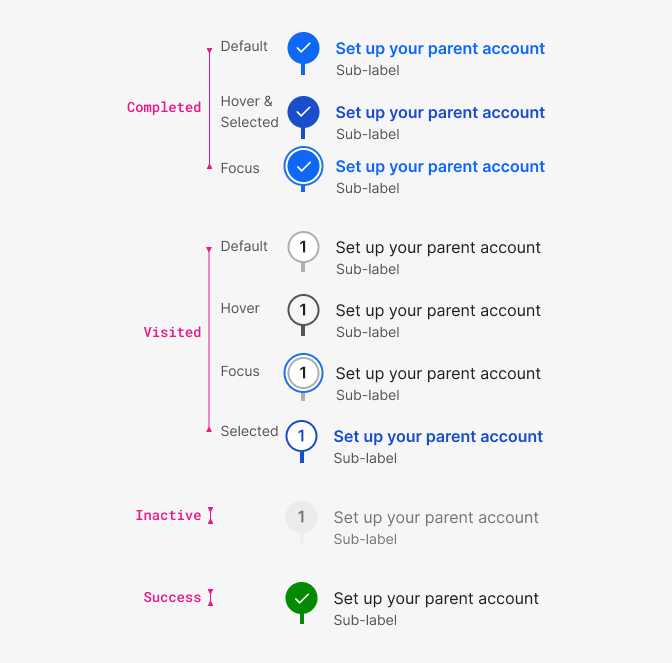
| Property & Element - Completed | Token | Hex |
|---|---|---|
| Circle bg - default, focus | $blue800 | # |
| Circle bg - hover & selected | $blue900 | # |
| Title font - default, focus | $blue800 | # |
| Title font - hover&selected | $blue900 | # |
| Subtitle font | $grey800 |
.
| Property & Element - Visited | Token | Hex |
|---|---|---|
| Circle bg - default, focus, selected | $white | # |
| Circle bg - hover | $grey100 | # |
| Border - default, focus | $grey600 | # |
| Border - hover | $grey800 | # |
| Border - selected | $blue900 | # |
| Font (title, number) - default, hover, focus | $grey1000 | # |
| Font (title, number) - selected | $blue900 | # |
| Font (subtitle) | $grey800 | # |
.
| Property & Element - Inactive | Token | Hex |
|---|---|---|
| Circle bg | $grey200 | # |
| Font (number, title, subtitle) | $grey600 | # |
.
| Property & Element - Success | Token | Hex |
|---|---|---|
| Circle bg | $success | # |
| Checkmark icon | $white | # |
| Font (title) | $grey1000 | # |
| Font (subtitle) | $grey800 | # |
.
| Property & Element - Completed & Current | Token | Hex |
|---|---|---|
| Focus shadow. - 2px blue | $blue800 | # |
| Focus shadow - 2px white gap | $white | # |
.