
Structure
Organize tabs logically based on content categories or user tasks. Maintain consistent tab sizes for a balanced layout. Use clear labels that succinctly describe the tab's content. Prioritize user experience by considering responsive design, ensuring tabs adapt well to different screen sizes.
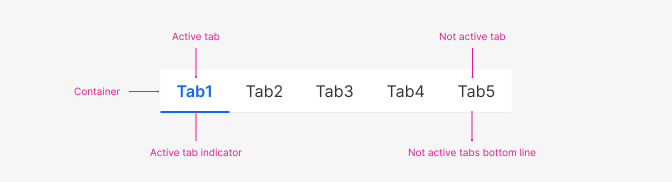 Tabs
Tabs
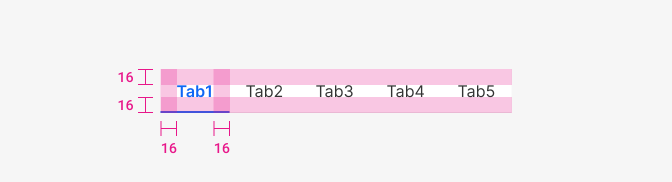 Paddings
| Property | Token | rem | px |
|---|---|---|---|
| Padding left & right | space $4 | 1 | 16 |
| Padding top & bottom | space $4 | 1 | 16 |
Typography
Maintain a consistent font size and style for tab labels to create visual hierarchy.
 Tabs typography
| Property | Token | Weight | Size | rem | px |
|---|---|---|---|---|---|
| Active tab font | $body | 600 | $md | 1 | 16 |
| Not active tab font | $body | 400 | $md | 1 | 16 |
Colours & Variants
Tabs can be preselected, unselected, or disabled. One tab can be selected at a time, and if a user navigates away from a tab, a user should return to the last tab selected.

Active
| Property | Token | Hex |
|---|---|---|
| Bg color | $white | #FFFFFF |
| Active tab font-color | $primary800 | #0F67F5 |
| Active tab bottom line | $primary800 | #0F67F5 |
| Not active tab font-color | $grey900 | #333333 |
| Not active tabs bottom line | $grey200 | #EEEEEE |

Hover
| Property | Token | Hex |
|---|---|---|
| Hover tab bg color | $blue200 | #E8F1FE |
| Hover tab font-color | $blue900 | #184BC8 |

Focus
| Property | Token | Hex |
|---|---|---|
| Focus tab bg color | $white | #FFFFFF |
| Focus tab font-color | $blue900 | #184BC8 |
| Focus tab bottom line | $blue900 | #184BC8 |

Disabled
| Property | Token | Hex |
|---|---|---|
| Diasbled tab bg color | $white | #FFFFFF |
| Disabled tab font-color | $grey600 | #9E9E9E |
Mobile
Use buttons to communicate actions users can take and to allow them to interact with the content.
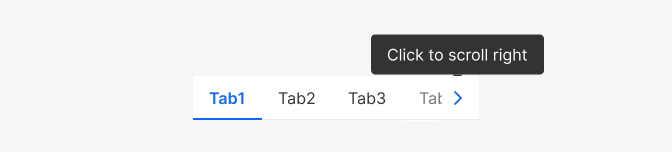
Mobile